O que toca no Música vai direto para o seu Last.fm.
What plays in Music goes straight to your Last.fm.
DCLiner fica na barra de menus, percebe cada faixa que você ouve no app Música e registra no Last.fm sozinho. Sem janela aberta, sem botão para lembrar de apertar.
DCLiner sits in the menu bar, notices every track you play in the Music app and records it on Last.fm by itself. No window to keep open, no button to remember.
Requer macOS 26 Tahoe ou posterior, o app Música e uma conta gratuita no Last.fm.
Requires macOS 26 Tahoe or later, the Music app and a free Last.fm account.
Conta como ouvida quando o Last.fm diz que conta.
It counts as played when Last.fm says it does.
- 50%da faixa tocada é o mínimo. Dá para subir esse limite nos Ajustes.of the track is the minimum. You can raise it in Settings.
- 4:00minutos bastam para qualquer faixa, por mais longa que seja.minutes are enough for any track, however long.
- ≤0:30faixas de 30 segundos ou menos nunca viram scrobble.tracks of 30 seconds or less are never scrobbled.
Discreto na barra de menus. Completo quando você abre.
Quiet in the menu bar. Complete when you open it.
A faixa na barra de menus
The track in your menu bar
Só o ícone, ou o ícone com música, artista e álbum. Se o texto não couber, ele rola duas vezes quando a faixa troca e para. Passe o mouse para rolar de novo.
Just the icon, or the icon with song, artist and album. If the text doesn’t fit, it scrolls twice when the track changes, then stops. Hover to scroll again.
O painel com um clique
The panel in one click
Capa, música, artista, álbum, ano e gênero, com a barra de progresso e atalhos para abrir a janela, os Ajustes ou sair. Em três tamanhos.
Artwork, track, artist, album, year and genre, with a progress bar and shortcuts to open the window, Settings or quit. In three sizes.
Janela principal
Main window
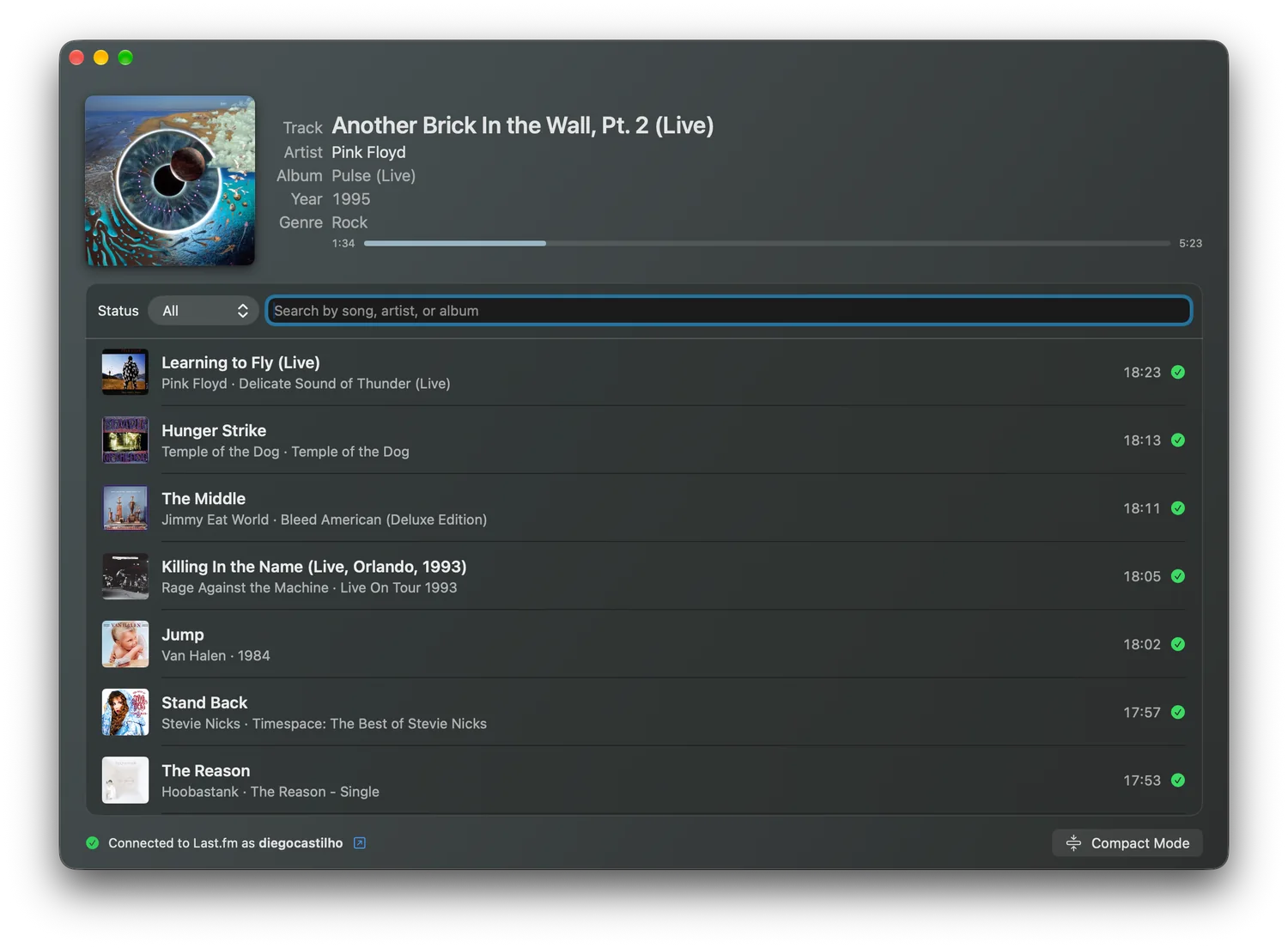
A faixa atual em destaque, com a cor da capa no fundo, e o registro de cada reprodução com busca e filtro por status. Precisa de menos espaço? Use o modo compacto.
The current track up top, tinted with the artwork’s color, and a log of every play with search and a status filter. Need less room? Use compact mode.
Widgets na mesa
Desktop widgets
A capa e a faixa atual na mesa do Mac, com progresso, estado do scrobble e os últimos scrobbles com miniaturas nos tamanhos maiores.
The artwork and current track on your Mac’s desktop, with progress, scrobble status and your latest scrobbles with thumbnails in the larger sizes.
Seu histórico, trazido para cá
Your history, brought in
Importe o que você já scrobblou no Last.fm. A importação pode ser pausada e retomada e não duplica o que já existe.
Import what you’ve already scrobbled on Last.fm. The import can be stopped and resumed, and it doesn’t duplicate what’s already here.
Nada se perde offline
Nothing lost offline
Sem internet, os scrobbles esperam numa fila guardada no disco e são enviados quando a conexão volta, mesmo depois de reiniciar o Mac.
Without internet, scrobbles wait in a queue saved to disk and are sent when the connection returns, even after a restart.
Feito com os controles e as cores do próprio macOS.
Built with macOS’s own controls and colors.
A faixa atual no topo, com capa, ano, gênero e progresso. Abaixo, cada reprodução numa linha, com busca e filtro por status. No rodapé, a conta conectada e o botão do modo compacto.
The current track up top, with artwork, year, genre and progress. Below, one row per play, with search and a status filter. In the footer, the connected account and the compact mode button.

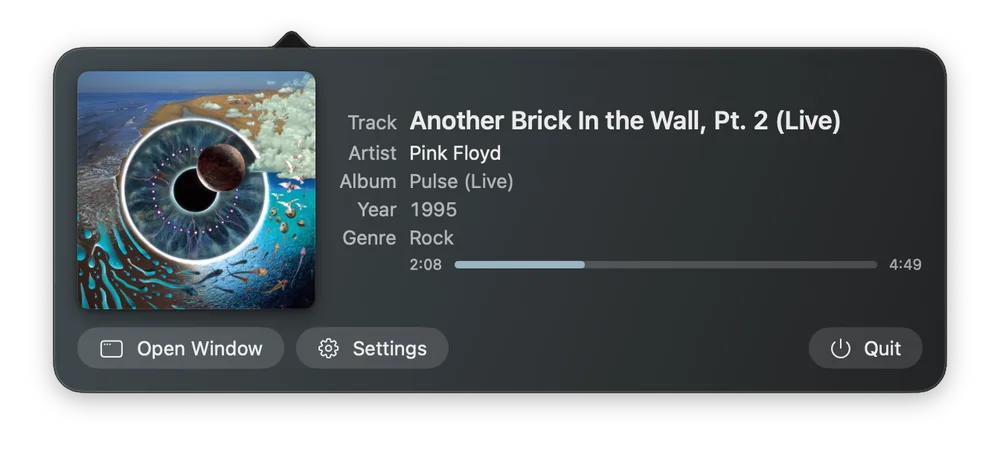
Clique no item da barra de menus para abrir o painel, e clique fora para fechar. O item pode mostrar só o ícone ou também música, artista e álbum, que rolam como um letreiro quando não cabem. O ano é sempre o do álbum, não o da reedição.
Click the menu bar item to open the panel, and click anywhere else to close it. The item can show just the icon or also the track, artist and album, which scroll like a marquee when they don’t fit. The year is always the album’s, not the reissue’s.
A faixa que está tocando, direto na mesa do Mac.
The track that’s playing, right on your Mac’s desktop.
Cinco tamanhos, do quadradinho só com a capa ao painel com os últimos scrobbles. Todos mostram capa, música, artista e álbum. Do médio para cima entram ano, gênero e a barra de progresso, e os dois maiores trazem a lista do que já foi para o Last.fm.
Five sizes, from a small square with the artwork to a panel with your latest scrobbles. All of them show artwork, track, artist and album. From Medium up you also get year, genre and a progress bar, and the two largest list what has already reached Last.fm.
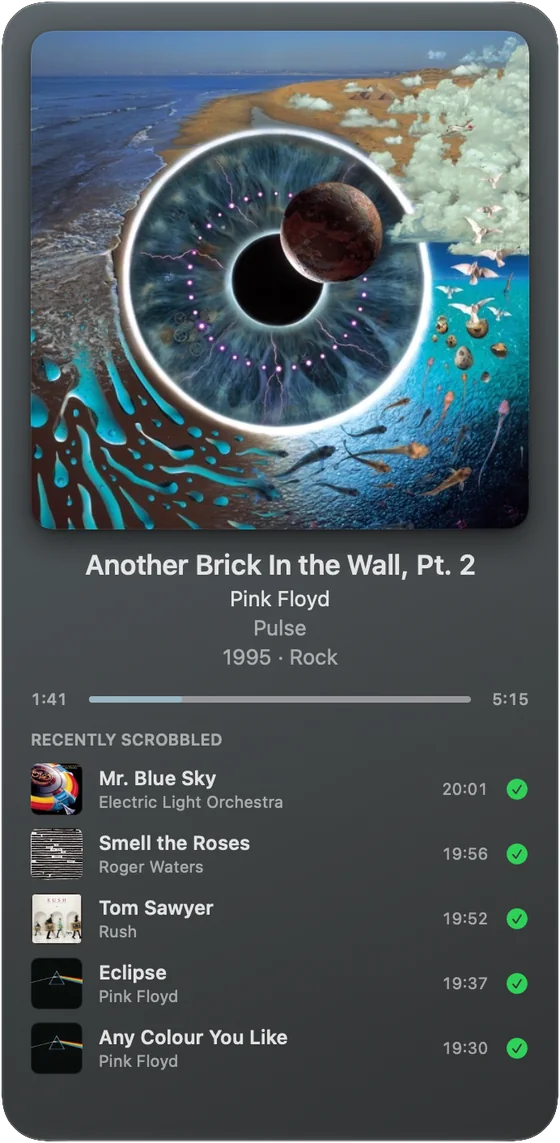
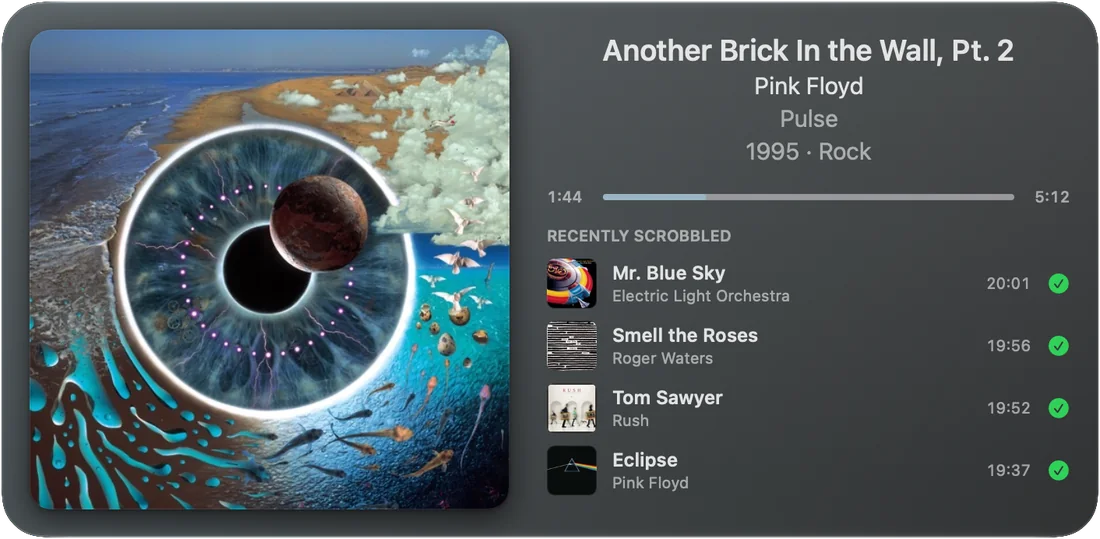
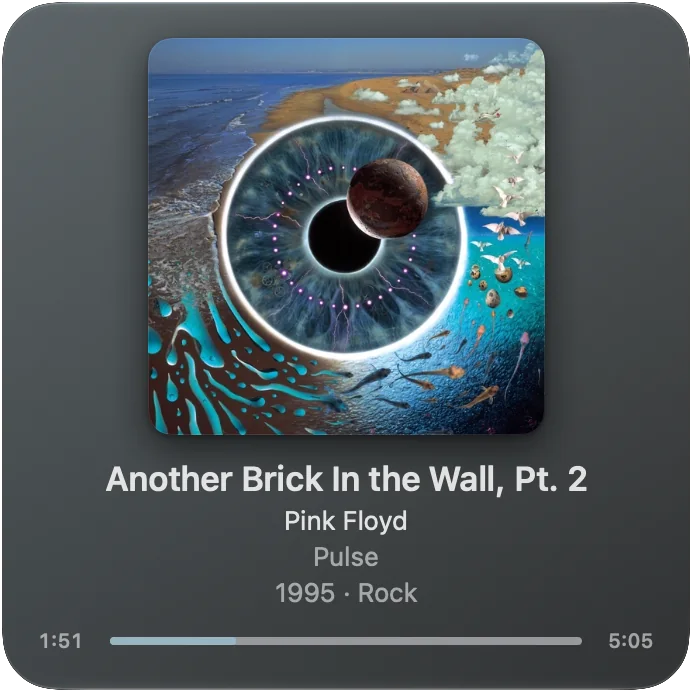
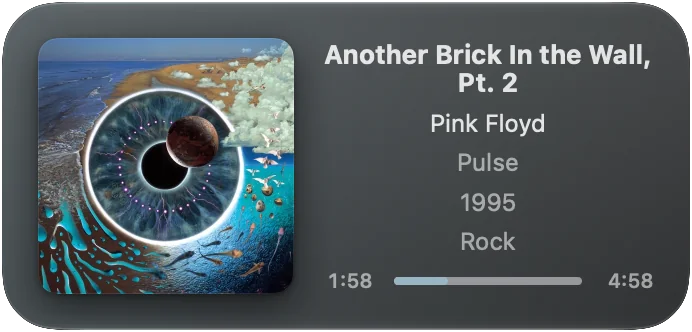
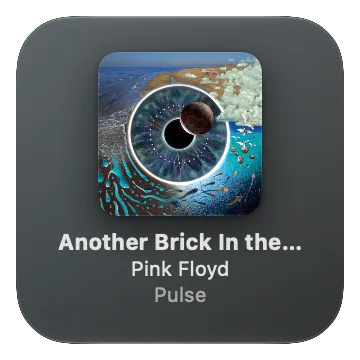
Para adicionar: clique com o botão direito numa área vazia da mesa, escolha Editar Widgets…, procure DCLiner e arraste o tamanho que quiser.
To add one: right-click an empty spot on the desktop, choose Edit Widgets…, search for DCLiner and drag the size you want.
Leve para a bateria: o próprio macOS anima a barra de progresso, fora do app, e o widget só se redesenha quando a faixa muda.
Easy on the battery: macOS animates the progress bar itself, outside the app, and the widget only redraws when the track changes.
Do download ao primeiro scrobble em poucos minutos.
From download to first scrobble in a few minutes.
Instale pela Mac App Store
Install from the Mac App Store
Procure por DCLiner na Mac App Store e instale. O app pede macOS 26 Tahoe ou posterior. O link direto aparece nesta página assim que o app for publicado.
Search for DCLiner on the Mac App Store and install it. The app needs macOS 26 Tahoe or later. A direct link will appear on this page once the app is published.
Abra e siga a apresentação
Open it and follow the welcome
Na primeira vez, uma janela de boas-vindas explica o essencial em três passos:
The first time, a welcome window covers the essentials in three steps:
- o app mora na barra de menus, não no Dock;
- ele funciona com a janela fechada, e é assim que se usa no dia a dia;
- ele não controla a reprodução, porque o macOS não oferece essa função a apps da App Store.
- the app lives in the menu bar, not the Dock;
- it works with the window closed, which is how you use it day to day;
- it doesn’t control playback, because macOS doesn’t offer that to App Store apps.
Conecte sua conta do Last.fm
Connect your Last.fm account
Clique em Conectar ao Last.fm…. O navegador abre a página do Last.fm: entre na sua conta e autorize o DCLiner. Não precisa voltar ao app para confirmar: a conexão se completa sozinha e aparece “Conectado como seu-usuário”.
Click Connect to Last.fm…. Your browser opens the Last.fm page: sign in and authorize DCLiner. You don’t need to come back and confirm: the connection completes on its own and shows “Connected as your-username”.
O DCLiner nunca vê sua senha. A autorização acontece no site do Last.fm e a chave da sessão fica no Keychain do macOS. O app espera a autorização por até 2 minutos; se passar disso, é só clicar de novo.
DCLiner never sees your password. Authorization happens on the Last.fm website and the session key is stored in the macOS Keychain. The app waits up to 2 minutes for you to authorize; after that, just click again.
Ligue “Abrir ao iniciar sessão” e traga seu histórico
Turn on “Open at Login” and bring in your history
No último passo, deixe o app abrir junto com o Mac. Um scrobbler só serve se estiver rodando quando a música toca. Se quiser, clique em Importar histórico do Last.fm. Os dois podem ficar para depois, nos Ajustes.
In the last step, let the app open with your Mac. A scrobbler is only useful if it’s running when the music plays. If you like, click Import Last.fm History. Both can wait for later, in Settings.
Dê play no app Música
Press play in the Music app
Pronto. Ao dar play, o Last.fm já mostra a faixa como “tocando agora”. Quando ela passar da metade, ou de 4 minutos, vira scrobble. Na primeira faixa, o macOS pergunta se o DCLiner pode acessar o Apple Music: é o que traz a capa e o ano do álbum. Se você recusar, o scrobble funciona do mesmo jeito.
That’s it. When you press play, Last.fm shows the track as “now playing”. Once it passes the halfway mark, or 4 minutes, it becomes a scrobble. On the first track, macOS asks whether DCLiner may access Apple Music: that’s what brings in the artwork and album year. If you decline, scrobbling works just the same.
Coloque um widget na mesa (opcional)
Add a widget to your desktop (optional)
Clique com o botão direito numa área vazia da mesa, escolha Editar Widgets…, procure DCLiner, escolha o tamanho e arraste para onde quiser.
Right-click an empty spot on the desktop, choose Edit Widgets…, search for DCLiner, pick a size and drag it where you want it.
Os Ajustes, aba por aba
Settings, tab by tab
Abra pelo botão Ajustes no painel da barra de menus, ou com ⌘, quando o app estiver na frente.
Open them from the Settings button in the menu bar panel, or with ⌘, when the app is in front.
| Aba | O que você ajusta |
|---|---|
| Conta | Conectar ou desconectar a conta do Last.fm e ver com qual usuário está conectado. |
| Scrobbling | Ligar e desligar o envio de scrobbles e do “tocando agora”, e escolher a partir de quanto da faixa ela conta (mínimo de 50%). Desligado, o histórico local continua sendo registrado. |
| Aparência | Mostrar ou esconder o ícone no Dock (vale na hora, sem reiniciar), o que aparece na barra de menus e o tamanho do painel. |
| Geral | Abrir ao iniciar sessão, abrir a janela principal junto com o app e o idioma, que segue o do macOS. |
| Histórico | Por quanto tempo guardar o registro de envios (7, 30 ou 90 dias, ou para sempre), importar o histórico do Last.fm e esvaziar o cache de capas. |
| Diagnóstico | Abrir o Console já com os registros do app e voltar todos os ajustes ao padrão. Sua conta e seu histórico não são afetados. |
| Sobre | Versão instalada e requisitos. |
| Tab | What you can change |
|---|---|
| Account | Connect or disconnect your Last.fm account and see which user you’re connected as. |
| Scrobbling | Turn scrobbles and “now playing” on or off, and choose how much of a track must play before it counts (50% minimum). When off, the local history is still recorded. |
| Appearance | Show or hide the Dock icon (takes effect immediately), what appears in the menu bar and the panel size. |
| General | Launch at login, open the main window at launch, and language, which follows macOS. |
| History | How long to keep the send log (7, 30 or 90 days, or forever), import your Last.fm history and clear the artwork cache. |
| Diagnostics | Open Console filtered to the app’s logs and reset all settings. Your account and history are not affected. |
| About | Installed version and requirements. |
O que você ouve vai para o seu Last.fm. E só.
What you listen to goes to your Last.fm. That’s all.
Sem telemetria
No telemetry
O app não tem análise de uso nem SDKs de terceiros. As faixas são enviadas apenas à sua própria conta do Last.fm.
The app has no usage analytics and no third-party SDKs. Tracks are sent only to your own Last.fm account.
Senha fora do app
Password stays out
Você autoriza no site do Last.fm. O app guarda só a chave da sessão, no Keychain do macOS, nunca em arquivo de preferências.
You authorize on the Last.fm website. The app keeps only the session key, in the macOS Keychain, never in a preferences file.
Sua biblioteca não é lida
Your library isn’t read
O acesso ao Apple Music serve para buscar capa, cor da capa e ano no catálogo. O app não lê suas playlists nem sua biblioteca.
Apple Music access is used to look up artwork, artwork color and year in the catalog. The app doesn’t read your playlists or library.
Isolado pelo sistema
Sandboxed
O app roda no App Sandbox da Apple, com acesso só à rede e ao app Música. Os registros de diagnóstico não guardam o que você ouve em texto claro.
The app runs in Apple’s App Sandbox, with access only to the network and the Music app. Diagnostic logs don’t store what you listen to in plain text.
Leia a política de privacidade completaRead the full privacy policy →
Perguntas frequentes
Frequently asked questions
Uma faixa não apareceu no Last.fm. O que verificar?A track didn’t show up on Last.fm. What should I check?
- No rodapé da janela principal deve aparecer “Conectado ao Last.fm como…”.
- Em Ajustes › Scrobbling, “Enviar scrobbles” precisa estar ligado.
- A faixa precisa ter mais de 30 segundos e tocar até o ponto definido (metade, ou 4 minutos).
- Veja o ícone ao lado do horário na lista da janela principal: o ✓ verde quer dizer que o Last.fm recebeu. Sem ele, o envio ainda está na fila e vai ser tentado de novo.
- The main window’s footer should say “Connected to Last.fm as…”.
- In Settings › Scrobbling, “Send Scrobbles” must be on.
- The track must be longer than 30 seconds and play past the set point (halfway, or 4 minutes).
- Check the icon next to the time in the main window list: a green ✓ means Last.fm received it. Without it, the send is still queued and will be retried.
Por que não há botões de play e pausa?Why are there no play and pause buttons?
O macOS não oferece a apps da Mac App Store uma forma de controlar a reprodução de outro app. Use o próprio Música, o teclado ou a Central de Controle.
macOS doesn’t give Mac App Store apps a way to control another app’s playback. Use Music itself, your keyboard or Control Center.
E se eu estiver sem internet?What if I’m offline?
Os scrobbles ficam numa fila guardada no disco e são enviados quando a conexão volta. Cada um tem até 8 tentativas; o que o Last.fm não aceita mais é descartado.
Scrobbles wait in a queue saved to disk and are sent when you’re back online. Each gets up to 8 attempts; anything Last.fm no longer accepts is dropped.
Apareceu “Sua sessão expirou”.I see “Your session has expired”.
Conecte a conta de novo em Ajustes › Conta. Os scrobbles que estavam esperando são enviados logo em seguida.
Reconnect your account in Settings › Account. Scrobbles that were waiting are sent right after.
Uma faixa ficou sem capa.A track has no artwork.
A capa vem do catálogo do Apple Music, ou do Last.fm quando o catálogo não tem. Arquivos locais e uploads podem não ter capa em nenhum dos dois. Se você recusou o acesso ao Apple Music, pode liberá-lo em Ajustes do Sistema › Privacidade e Segurança › Mídia e Apple Music.
Artwork comes from the Apple Music catalog, or from Last.fm when the catalog has none. Local files and uploads may have artwork in neither. If you declined Apple Music access, you can allow it in System Settings › Privacy & Security › Media & Apple Music.
O widget está vazio.The widget is empty.
O widget mostra a faixa atual enquanto o DCLiner estiver aberto. Se nada tocar por mais de 6 horas, ele volta ao estado vazio, para não ficar exibindo uma faixa antiga.
The widget shows the current track while DCLiner is running. If nothing plays for more than 6 hours, it goes back to its empty state rather than showing an old track.
Funciona com o Spotify?Does it work with Spotify?
Por enquanto, só com o app Música da Apple.
For now, only with Apple’s Music app.
Como mudo o idioma do app?How do I change the app’s language?
O DCLiner está em português e inglês e segue o idioma do macOS. Para escolher outro só para ele: Ajustes do Sistema › Geral › Idioma e Região › Aplicativos.
DCLiner comes in English and Portuguese and follows your macOS language. To pick a different one just for it: System Settings › General › Language & Region › Applications.
Algo não funcionou? Escreva para mim.
Something not working? Write to me.
O DCLiner é feito por uma pessoa só, e cada mensagem é lida. Antes, vale passar pelas perguntas frequentes: a maioria das dúvidas tem resposta ali.
DCLiner is made by one person, and every message gets read. First, check the FAQ: most questions are answered there.
Para responder mais rápido, inclua: a versão do DCLiner (Ajustes › Sobre), a versão do macOS e o que aconteceu, de preferência com um print da tela.
To get a faster answer, include: your DCLiner version (Settings › About), your macOS version and what happened, ideally with a screenshot.
Chegando à Mac App Store.
Coming to the Mac App Store.
O DCLiner está em fase final de testes. O botão ao lado vai levar direto à página do app assim que ele for publicado.
DCLiner is in final testing. The button will take you straight to the app’s page as soon as it’s published.